
Personalize Your Tesla with a Custom Lock / Chime Sound — How To and Restrictions
Your Tesla can now reflect your personality with a customized lock sound, adding a touch of individuality to the typical beeping or honking found in most cars.
This feature, introduced in the 2023 Holiday Update, allows users to choose a lock sound from a preset list or even upload their own custom sound file.
Here’s a guide on how to set and create a unique lock sound for your Tesla.
Vehicle Requirements
To use a custom lock sound, your vehicle must be equipped with Tesla’s external pedestrian warning system (PWS) speaker. This speaker was integrated into Tesla vehicles starting around September 2019, with the timing varying by model and region.
If your vehicle lacks the speaker but has the necessary wiring, you can contact Tesla Service to retrofit the PWS. You can confirm the presence of the PWS speaker if your vehicle emits a sound at low speeds.
Finding Custom Sounds
Explore our collection of custom lock sounds specifically designed for Tesla vehicles. From retro video game sounds to iconic cartoon clips, you’ll find a variety of options to suit your preference. These sounds are optimized for use in your Tesla and meet all requirements.
Simply download the sound file, rename it to LockChime.wav, and transfer it to your vehicle’s USB drive.
How to Save a Custom Sound
You can choose any sound, but ensure it meets the following limitations and requirements:
-
The sound file must be in .wav format
-
The file size should be under 1 MB
-
The file must be named LockChime.wav
Place the sound file in the root directory of the USB drive (not within any folder). Tesla vehicles typically include a USB drive in the glove box where Dashcam and Sentry Mode footage is stored. Remove the USB drive, connect it to your computer, save the sound file, and reinsert the drive back into the vehicle.
Current Limitations
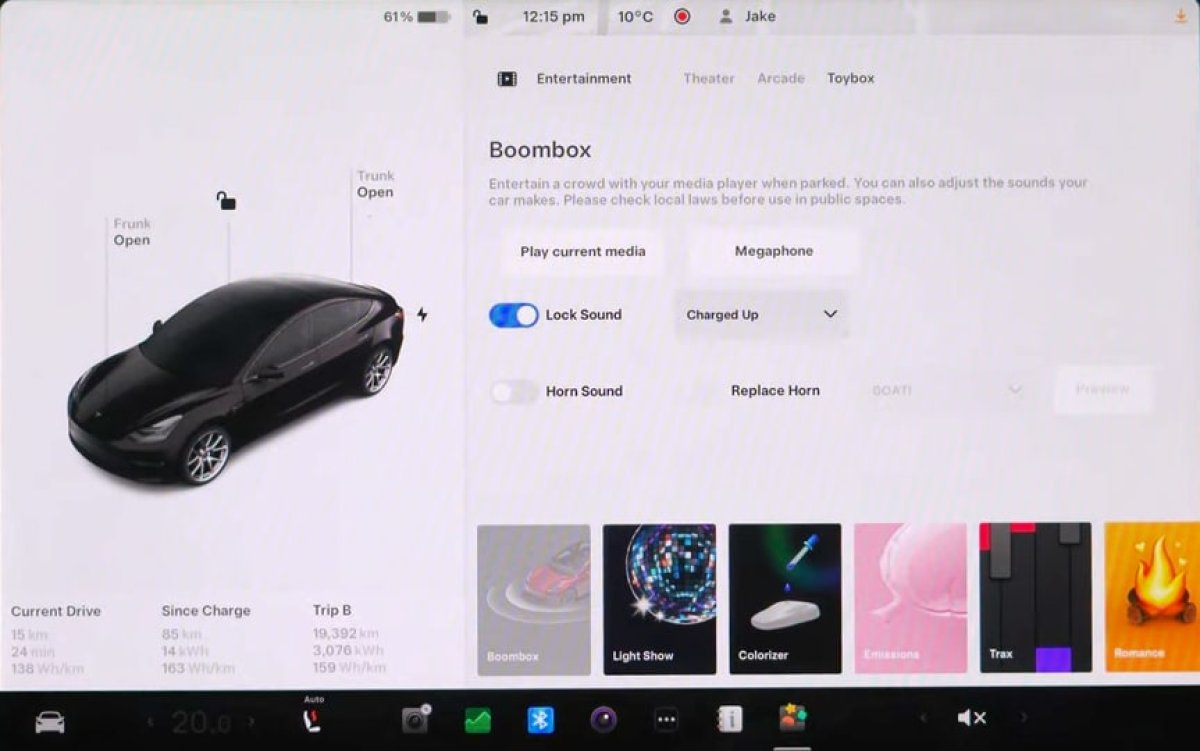
Choosing Your Lock Sound
-
Access Toybox (located in the All apps menu)
-
Click on Boombox
-
Activate Lock Sound
-
Choose USB from the sound list
If you wish to use your custom sound saved on the USB drive, select USB from the menu.
Custom Horn Sound
It’s important to note that while Tesla allows a custom horn sound, it is only active when the vehicle is parked. When driving, the horn reverts to its standard sound to comply with NHTSA regulations.