
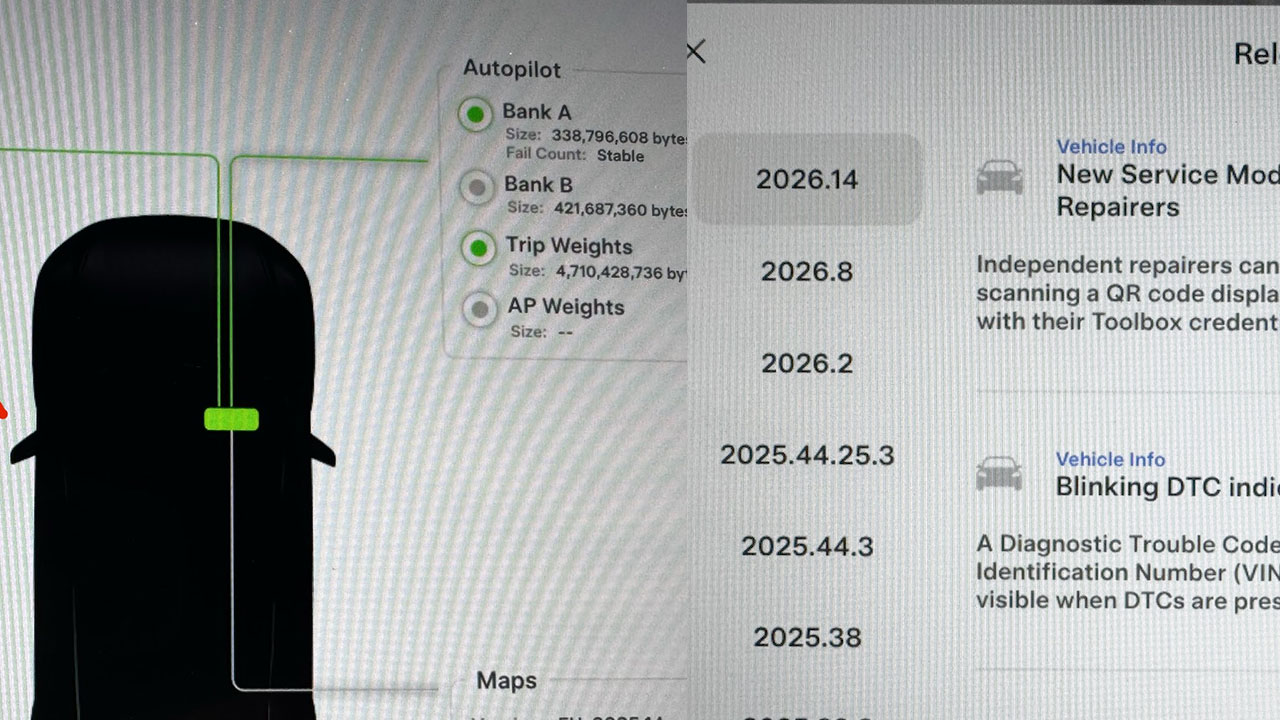
The 2026 Spring Software Update from Tesla is not just about adding fun and useful features for daily use; it also includes improvements to background tasks for Service Mode. Tesla owners who have already received and installed the 2026 Spring Update version 2026.14 or its subversion point releases now have additional Service Mode features and improvements in existing ones.
Tesla Service Mode is a special interface used for diagnostics and troubleshooting issues in a Tesla vehicle. Initially only available to Tesla Service Center staff, the automaker has now allowed access to these software tools for owners and technicians.
The Service Mode in the 2026 Spring Update has seen improvements to Service Mode Plus, DTC indicators, Noise Recording Panel, Vehicle Functions Panel, and the Bluetooth Panel.
Service Mode Plus provides advanced tools for diagnostics, calibration, and troubleshooting for technicians, accessed via the special Tesla Toolbox software on a laptop. Service Mode Plus can be accessed via a physical port in the LH (left-hand) footwell to connect to a computer. After installing the Spring Update (2026.14 or later), independent repairers (owners and technicians) can quickly authenticate themselves using a QR code to access Service Mode Plus.
The release notes for the Spring Update Service Mode (2026.14, 2026.14.1, and 2026.14.2) include new features such as a QR code for independent repairers to quickly authenticate for Service Mode Plus and a blinking DTC indicator added to the bottom banner to indicate the presence of DTCs on the vehicle.
The Noise Recording Panel now supports Active Noise Cancellation (ANC) microphone recording and extends the recording duration to 3 minutes when ANC mode is enabled. The Vehicle Functions Panel and the new Bluetooth Panel have also been added to Service Mode, providing an overview of degraded vehicle functions, set alerts, and Bluetooth diagnosis support.
Overall, the 2026 Spring Update has brought significant improvements to Service Mode, enhancing the diagnostic and troubleshooting capabilities for Tesla owners and technicians. Stay tuned for more Tesla updates by following us on Google News, Flipboard, Twitter, WhatsApp Channel, and RSS (Feedly).